
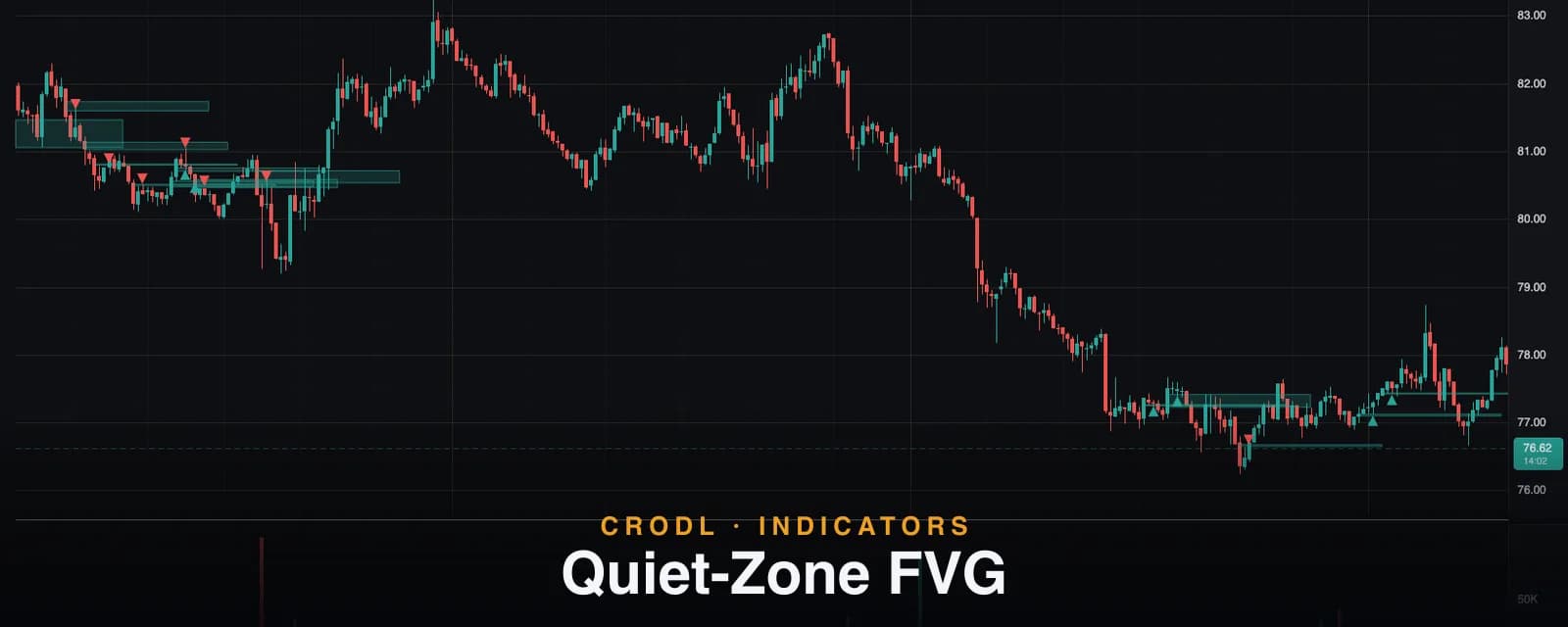
Quiet-Zone FVG
Quiet-Zone FVG surfaces fair value gaps whose first retest happens on unusually low volume — an experimental filter for the gaps most likely to hold as zones.
Every Fair Value Gap looks the same when it forms: three candles, one skipped band of prices, one box on the chart. The difference shows up later — in how price first comes back. Some gaps get retested on a burst of volume, a genuine fight at the level. Others get touched almost silently: price drifts in, nobody presses, and the level holds.
Quiet-Zone FVG on the Crodl terminal is built around that second case. It detects gaps exactly like the standard FVG study, then watches each one's first retest and measures how much volume traded during it. Gaps whose first reaction was quiet — less volume than a fraction of one normal bar — get highlighted; everything else is dimmed or hidden. One thing to say plainly up front: this is an experimental study. The mechanics below are exact and the classification is deliberately non-repainting, but the underlying edge is a hypothesis under evaluation, not an established market law. Treat it accordingly.
What it shows — and why a quiet retest matters
The reasoning: a fair value gap marks one-sided aggression. When price returns to it, two things can happen. If the return is loud — heavy volume trading inside the zone — the level is being contested, and contested levels resolve unpredictably. If the return is quiet, the retest is passive: sellers (into a bullish gap) are not pressing, the drift back is more likely a mechanical rebalance than a reversal, and the gap's original imbalance still stands. Low-effort retests of one-sided levels are a classic absorption tell, applied here to imbalances instead of horizontal support.
So the study keeps the familiar FVG boxes but adds one binary flag per zone — quiet or not — plus an entry marker at the first touch of every quiet zone.
How it works on the Crodl terminal
1. Detection. Identical three-candle imbalance logic to the standard FVG study (bullish when a candle's low clears the high from two bars back; bearish mirrored). Nothing is re-invented at this stage.
2. First touch. For each gap, the indicator finds the first bar after the gap's formation candle whose range enters the zone. That bar is the retest.
3. The reaction window. Starting at the touch bar (inclusive), it takes a window of Quiet window (bars) bars — default 3 — and sums the volume of the bars in that window that actually overlap the zone. The touch bar usually carries the heaviest in-zone volume, and it counts.
4. The threshold. The Threshold mode select (default Relative (× avg volume)) decides what "quiet" means:
- Relative — the reaction must total no more than Relative K (× avg vol) (default 0.9) times the average bar volume over the Avg volume lookback (default 20) bars ending just before the touch. In plain terms with defaults: the entire three-bar reaction has to move less volume than roughly one ordinary bar. The baseline deliberately excludes the touch bar itself, so the retest can't inflate its own yardstick.
- Absolute — the reaction is compared to a raw Absolute volume threshold you set yourself (default 0), for traders who know their market's numbers.
5. Display. With Show only quiet zones on (default), only the quiet subset is drawn, in the highlight color. Turn it off and loud or still-pending zones appear too, dimmed grey, so you can watch classifications resolve. Show entry markers (default on) draws a triangle at each quiet zone's first touch, on the zone's actionable edge — an up-triangle under a bullish gap's top (support, long side) or a down-triangle above a bearish gap's bottom (resistance, short side).
| Zone state | Meaning | How it is drawn |
|---|---|---|
| Quiet | First reaction closed below the threshold | Highlighted box + entry triangle |
| Loud | First reaction exceeded the threshold | Dim grey (hidden by default) |
| Pending | Touched, but the reaction window hasn't fully closed | Dim grey (hidden by default) |
| Untouched | No bar has entered the zone yet | Dim grey (hidden by default) |
The non-repaint guarantee. A zone is only classified once its entire reaction window has closed — until then it stays pending. A touch by the still-forming live bar can never classify a zone, only mark it pending. Once the flag is set, it is frozen: future candles cannot flip a quiet zone loud or vice versa. What you see in a replay is what you would have seen live.
How traders actually use it
The second-entry play
Because classification waits for the reaction window to close, the quiet flag confirms up to a couple of bars after the first touch — often too late for that exact touch. The cleaner play is the second visit: once a zone is flagged quiet, treat its near edge as validated support or resistance and set alerts or resting orders for the next time price returns to it. The first quiet retest is your evidence; the second retest is your trade.
A volume filter over your existing FVG playbook
If you already trade standard FVG retraces, run Quiet-Zone FVG alongside with Show only quiet zones on. Same zones, same lifecycle — but only the retests the market didn't fight over. It functions as a probability filter on the playbook you already have, and pairs naturally with the volume-budget view in FVG Profiles.
Confluence with liquidity sweeps
A quiet bullish gap sitting just below a level that Liquidity Zones marks as recently grabbed is a strong combination: stops were swept, and the drift back into the imbalance drew no selling interest. Quiet + swept is the low-opposition version of a reversal setup.
Experimental status, honestly
This study is opt-in and labeled experimental for a reason. The threshold is deliberately blunt — one number against one baseline — and market-wide quiet periods (weekends, holiday sessions) can make everything look quiet, in which case the flag carries little information. Relative mode helps because the 20-bar baseline compresses too, but it does not fully solve it. Only volume from bars that actually overlap the zone counts, which is a design choice, not a universal truth. And the core hypothesis — quiet first reactions predict zones that hold — is being evaluated, not proven. Use it as a filter on setups you would already take, not as a signal generator.
Frequently Asked Questions
Why is it labeled experimental?
Because the classification mechanics are exact but the edge is a hypothesis. The study ships opt-in so traders can evaluate the quiet filter on their own markets and timeframes without it being presented as settled fact.
Does it repaint?
No — this is the study's strictest guarantee. A zone stays pending until every bar of its reaction window has closed, a live-bar touch can only pend (never classify), and a set flag is frozen forever. The trade-off is honesty about latency: the flag arrives only after the window completes.
Should I use Relative or Absolute mode?
Relative (the default) adapts across symbols and timeframes automatically — "quieter than 0.9 of a normal bar" means the same thing on BTC 5m and an altcoin 1h. Absolute mode is for traders who watch one market closely and want a fixed volume line in the sand.
Why did the entry marker appear a few bars after the touch?
By design. The marker is placed at the first touch, but it can only be drawn once the reaction window closes and the zone is confirmed quiet — with the default 3-bar window, that is up to 2 bars later. That is the price of the non-repaint guarantee, and it is why the second-entry play above is the recommended way to trade it.
Try the quiet filter on your pairs
Quiet-Zone FVG is available on every Crodl terminal chart — add it from the indicator picker, leave the defaults on, and see which of your market's gaps the crowd never bothered to fight over, live across six exchanges.
This article is for educational purposes only and is not financial advice. Leveraged trading carries substantial risk of loss. Always do your own research and never risk more than you can afford to lose.

Ready to automate your trading?
Connect your exchange, set up automations, and start trading smarter — all from one platform.
Start Trading Free