
Sentinel Trail
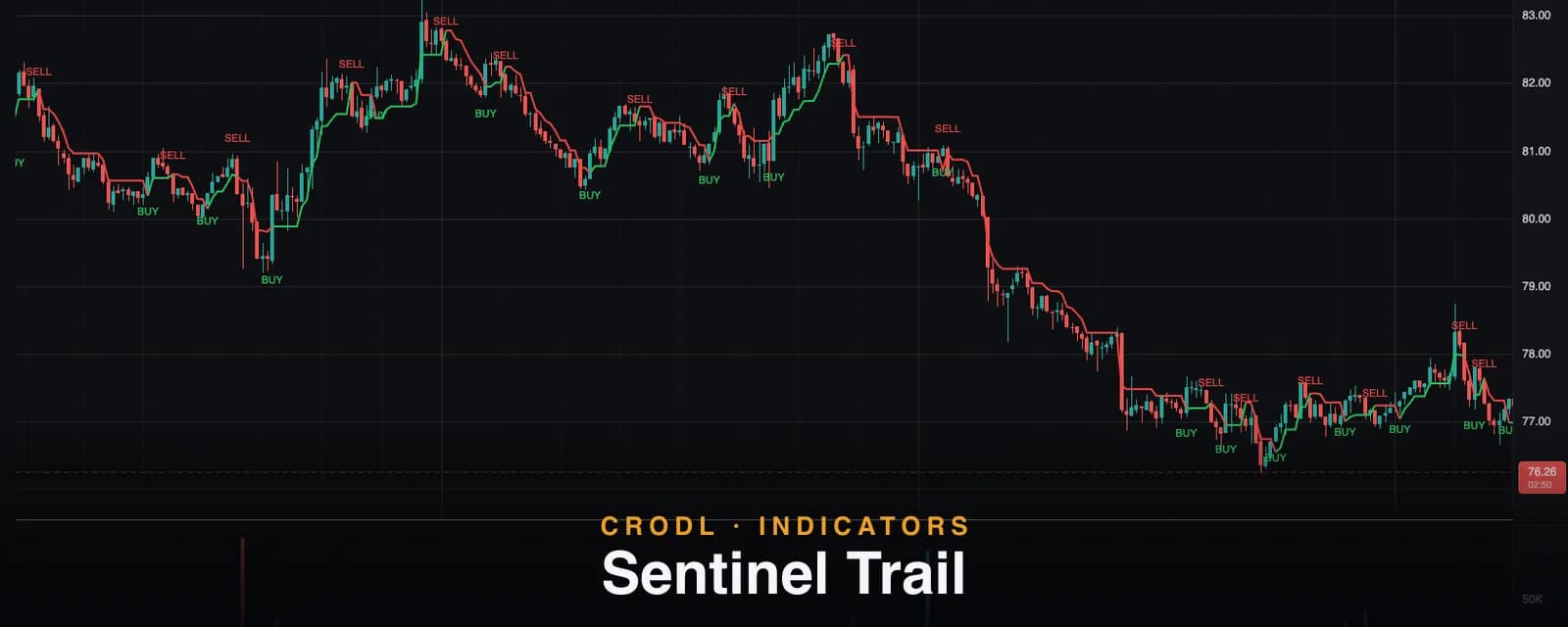
A CRODL take on the classic UT Bot: an ATR trailing stop that ratchets behind price and flips with it, colored by regime. How Sentinel Trail works on the terminal.
The hardest problem in trading is not finding entries — it is knowing when a move is over. Exit too early and you donate the meat of the trend; exit too late and you round-trip the whole trade. A volatility-scaled trailing stop solves this mechanically: it follows price at a distance set by how much the market normally wiggles, so ordinary noise never touches it and a genuine reversal always does.
Sentinel Trail is CRODL's take on the most battle-tested version of that idea — the classic UT Bot trailing stop. One line on your chart: green and below price while the regime is bullish, red and above price while it is bearish. When price crosses the line, the line flips sides, a BUY or SELL label prints, and the regime color changes. No dashboards, no confluence scores — a single, honest line that ratchets with the trend and tells you the moment price breaks it.
This post explains what the trail measures, exactly how the Crodl preset computes it — including its optional Heikin Ashi source — and the ways traders use it for both exits and entries.
What Sentinel Trail shows
The trail is a stop line whose distance from price is Sensitivity × ATR — average true range, the standard measure of how far a bar typically travels (covered in depth in our ATR guide). Two behaviors define it:
- It ratchets. In a bullish regime the trail sits below price and can only move up. Price rallying pulls it higher; price pulling back leaves it exactly where it was. Progress is locked in, never given back. The bearish mirror holds above price and only moves down.
- It flips. When price crosses the trail, the regime ends: the line jumps to the other side of price, the color flips between green and red, and a BUY or SELL label marks the bar. Both events are wired to built-in alerts.
Because the distance is denominated in ATR rather than percent, the trail self-adjusts to conditions: it gives a volatile market room to breathe and hugs a quiet one tightly. That is the entire reason ATR trails age better than fixed-percentage stops in crypto, where volatility can triple in a week.
How it works on the Crodl terminal
Sentinel Trail is a Rune preset — a faithful port of the classic UT Bot Alerts study, readable and editable in the terminal's Rune editor. Its settings:
- Sensitivity (Key Value) — default
1, range 0.1–10. The ATR multiplier. The classic default of 1× is tight and fast; raising it widens the trail and slows the flips. - ATR Period — default
10, range 1–200. The volatility lookback. - Signals from Heikin Ashi — default off. When enabled, the trail and its crosses are computed from the Heikin Ashi close — the average of the bar's open, high, low, and close — instead of the raw close. Averaging the full bar smooths single-print noise, which typically means fewer, later flips.
- Bull / Bear Color — the regime colors, default green and red.
Per bar, the script computes the stop distance (Sensitivity × ATR(ATR Period)), applies the UT-Bot ratchet — trail rises with price in up-regimes, falls with it in down-regimes, and jumps to the far side on a cross — then latches the regime state that colors the line. Flips print BUY below the bar's low or SELL above its high, and fire the corresponding alert.
Sentinel Trail is one of two UT-Bot derivatives on the terminal, and choosing between them is mostly about how filtered you want your signals:
| Sentinel Trail | Risk Pilot | |
|---|---|---|
| Trail | 1 × ATR(10) — tight, fast | 6.3 × ATR(21) — wide, slow |
| Trend filter | None — every flip signals | Trend SMA gate + strict alternation |
| Source options | Close or Heikin Ashi close | Close |
| Best suited to | Exits, scalps, fast timeframes | Filtered swing entries |
The Risk Pilot post covers the filtered side of that table in detail.
How traders use it
As the exit engine
The highest-value use is position management. Enter a long on whatever your process signals, then trail your stop just beyond the green line as it ratchets up. You stop negotiating with yourself about exits: the market either keeps making progress — and the line follows — or it breaks the structure that justified the trade, and you are out on the flip. This is the job the UT Bot design has quietly done for years.
Flip-following on fast timeframes
At the default 1× ATR(10), the trail flips often enough to trade directly on low timeframes: long on BUY, flat or short on SELL, repeat. The honest caveat: an unfiltered flip system takes every whipsaw the chop can offer. Traders running it this way usually add a regime gate — only take BUY flips while a Quantum Pro band is green or price holds above a long EMA — or step up to Risk Pilot, which builds the filter in.
The Heikin Ashi switch
Enabling the Heikin Ashi source is a one-toggle smoothing upgrade: the trail keys off the bar's OHLC average, so a single wild wick no longer forces a flip. The trade-off is symmetrical — you skip some fake-outs and you enter some real moves a bar or two later. It tends to earn its keep on wick-heavy pairs and lower timeframes.
Tuning the sensitivity
The Sensitivity dial is a frequency control. Scalpers keep it near 1; swing traders push it to 2–3 so ordinary pullbacks stop flipping the line. If you find yourself constantly re-entering after being flipped out, the fix is usually a higher multiplier, not a different tool — the same tension the Supertrend multiplier manages in its own family.
Frequently Asked Questions
Is Sentinel Trail the same as UT Bot Alerts?
Functionally, yes — it is a faithful port of the classic UT Bot Alerts logic under CRODL naming: same 1× ATR(10) defaults, same ratcheting trail, same cross-based BUY/SELL labels, same optional Heikin Ashi source. If you traded UT Bot elsewhere, this behaves the way you remember.
How is it different from a Supertrend?
Close cousins. Both are ATR trails that ratchet and flip; the Supertrend bands are anchored to the bar midpoint (hl2) with a 3× multiplier by default, while Sentinel Trail follows the close (or HA close) at 1× ATR — so it runs tighter and flips sooner. Different tuning of the same core idea.
What exactly does the Heikin Ashi option change?
Only the input series. Instead of the raw close, the trail and crosses use the average of the bar's open, high, low, and close — the Heikin Ashi close. Candles on your chart are unchanged; the signal line just reads a smoothed version of the tape.
Does it repaint?
No. Once a bar closes, its trail value, regime color, and any label are permanent. On the live bar the trail updates tick by tick and a flip is only final at the close — standard behavior for close-based systems, and a reason many traders act on the closed-bar signal rather than the intrabar one.
Put your exits on rails
Sentinel Trail is available on every Crodl terminal chart — add it from the indicator picker, wire the BUY and SELL alerts, and let the trail handle exit discipline, alongside live trading on six exchanges.
This article is for educational purposes only and is not financial advice. Leveraged trading carries substantial risk of loss. Always do your own research and never risk more than you can afford to lose.

Ready to automate your trading?
Connect your exchange, set up automations, and start trading smarter — all from one platform.
Start Trading Free